
Volcano Expanse T Midi Chassis
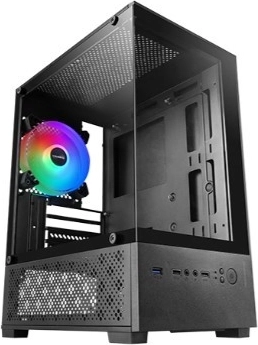
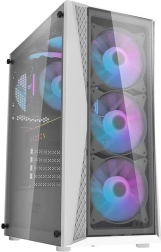
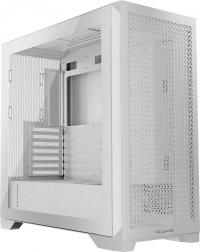
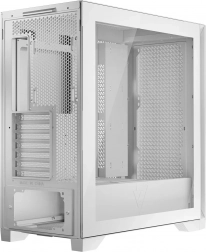
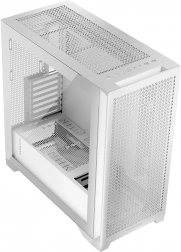
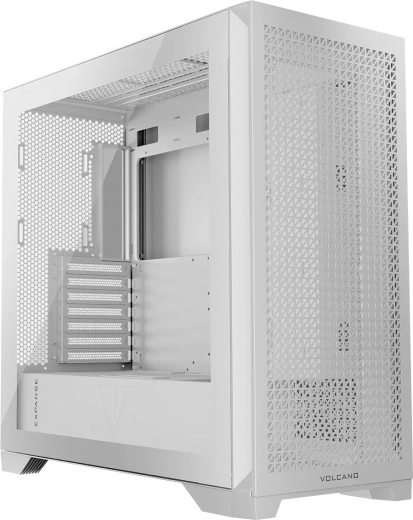
This is it – the source of gaming power... the Volcano Expanse Midi computer case. After all, what is a true gaming PC without a case that lets you install all components with maximum comfort and precision? With no flashy frills found in some new cases, this is a modern take on a classic. It’s packed with practical solutions for high-performance gaming PCs, including easily removable filters at the front and under the PSU, the option to mount a bracket for three additional fans in place of the cable organizer, plenty of room for gaming components, and excellent airflow. When looking for the best solutions, it’s good to return to the source.
Interior layout
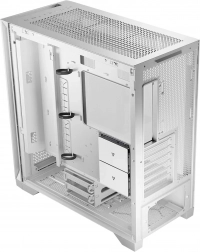
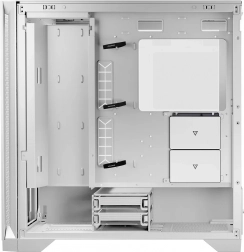
The Volcano Expanse T MIDI chassis lets you organize the interior so the PC is truly yours! At motherboard height there’s a dedicated area to mount either a cable shroud or a fan bracket. It’s up to you how you use this flexibility. The shroud helps you route cables and keep the inside neat—ideal for those who value aesthetics and tidiness. Building a true “gaming monster” and need the best cooling? You can replace the shroud with a bracket for three additional 120 mm fans.
Triangle of dreams
The Volcano Expanse T APEX ARGB MIDI case was designed with triangle-shaped panels. That’s where the “T” in the name comes from—triangle. How does it differ from its design twin, the Volcano Expanse S ARGB Midi? In this version, due to the different panel design, dust filters were added to the side and top of the case. Taste is subjective, so the choice is yours. Whichever version you pick, it’s a great decision.
Easy!
Keeping your PC clean is very important. To minimize dust ingress, a quick-release dust filter is placed at the front between the front panel and the chassis. Simply pop off the front panel (no need to remove the entire front section) and pull out the filter for fast, convenient cleaning. Anyone who cares about cleanliness, longevity, and functionality will appreciate this practical solution. Cleaning the front panel is a breeze!
No fans? That’s good for you!
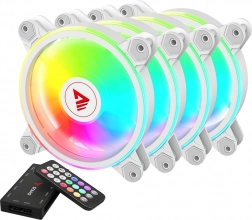
Cool operation is paramount. It improves efficiency and extends component lifespan. We give you the freedom to choose. Install fans from your previous case or buy ones that match your visual preferences. You have a free hand to find the best setup for your needs. You can install three 140 mm fans at the front and one 140 mm fan at the rear. For even more configuration options, you can additionally mount 3 × 120 mm or 2 × 140 mm fans on the top panel. Moreover, on the motherboard mounting panel there’s space to install three 120 mm fans by fitting a special bracket in place of the cable tray. In total you can have up to 10 fans!
No screws. Easy and pleasant – everything snaps in
The days of unscrewing panels are long gone. The Volcano Expanse chassis offers a simple and convenient solution that lets you build your dream PC with a smile. All panels are snap-on; you don’t need tools to remove them and install components comfortably. Want to add RAM sticks? Blow out interior dust? With a flick of your wrist you can remove the panels without unscrewing anything.
At your fingertips
The USB/Audio I/O panel is located at the top of the case for convenient access when the case sits under a desk. The panel includes 2 × USB 3.0 and one USB-C port. You also get standard microphone and headphone jacks, plus the power button and fan control.
Liquid cooling
The chassis is designed to accommodate liquid cooling. There’s room at the top for a radiator up to 360 mm. An equally large radiator fits at the front in place of pre-installed fans. The same 360 mm radiator can also be mounted on the dedicated motherboard bracket with a maximum thickness of 52 mm. At the rear, there’s space for a 120/140 mm liquid cooler. These solutions aim to create a true gaming machine for any title, all in a robust and airy design.
Dust filter
A dust filter is placed under the power supply unit. You can easily remove and reinstall it to keep the PC clean while improving PSU performance and safety, along with other installed components. It’s designed for easy install and removal, aided by magnetic elements. The filter is accessible from both the front and rear of the case. Dust filters are also installed on the top and side panels.
Space for your favorite games
The case offers plenty of room for your favorite games. You can install two 2.5" drives on the motherboard tray. In addition, you can install two 3.5" drives in the PSU tunnel. With this much storage capacity, you can confidently plan to install new titles.
Rubber grommets and Velcro cable organizers
As befits a gaming-focused case, rubber grommets are used inside at the PSU tunnel level to protect cables—especially the GPU power cable—from damage. There are also Velcro cable organizers on the back of the motherboard tray to keep the interior as tidy as possible.
Top cable management
Good cable management is not only aesthetically important but also improves airflow. A special metal structural element at the height of the motherboard mounting wall enables convenient routing and optimal cable organization. In this case, aesthetics and top-tier cable management go hand in hand.
Ventilation
Good airflow is ensured by square ventilation openings in the top, front, and side panels. To limit dust ingress, the front panel is equipped with a dust filter. Since the panels are attached with snap-on mounts, cleaning the filters is very easy.